What is a VPN and what are the benefits?
A Virtual Private Network (VPN) is a way of securely tunneling your data across the internet to a VPN server.
VPNs are used by organisations and individuals for different reasons.
Before using a VPN you should consider what benefits you get from using it…
Why do organisations use VPNs?
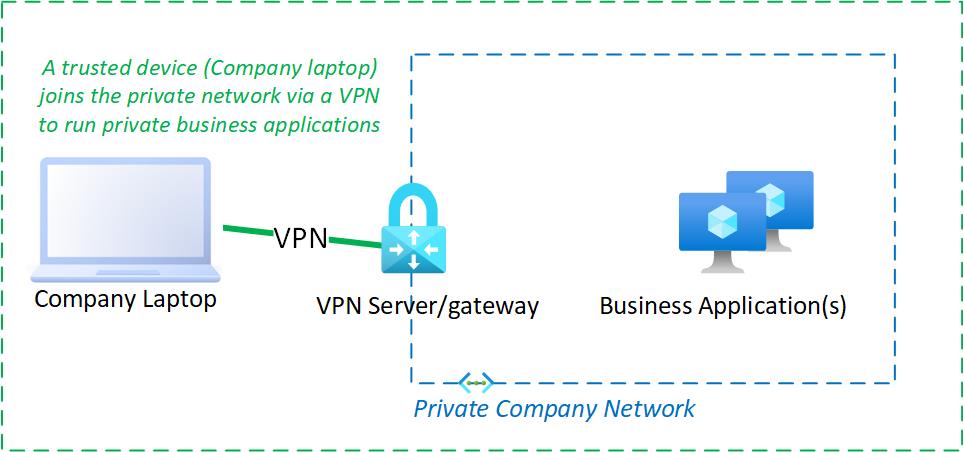
Organisations, companies, government departments etc. use VPNs to connect end-user devices to their private network to access internal applications or browse the internet more safely.
They deploy a VPN server on the external perimeter of their private network. A VPN client (installed on the end-user device) connects to the VPN server and in effect, creates a secure tunnel to the private network, with the VPN Server acting as a gateway.
AlwaysOn VPNs
Some organisations configure VPNs as ‘Always On’ which means they are permanently connected to their organisation’s private network. This provides the following benefits:
-
Users cannot enter usernames or passwords into potentially malicious WiFi hotspots, which may also attack the end-user device and/or intercept data.
-
All data, including internet access, is routed via the VPN to security controls in the organisation’s private network before onward transmission in a relatively safe and controlled manner.
Why do individuals use VPNs?
Individuals typically use VPNs for an entirely different purpose. Encouraged by the size, scale and global reach of many of the cheap VPN Providers available to them, they subscribe to a VPN Service. It is effectively a VPN to nothing but the geographic location specified by the VPN Service.
- Why do this?
- What are the benefits?
What can you expect from a VPN provider as an individual?
-
You download your VPN provider’s VPN client software and connect to the service location you choose
-
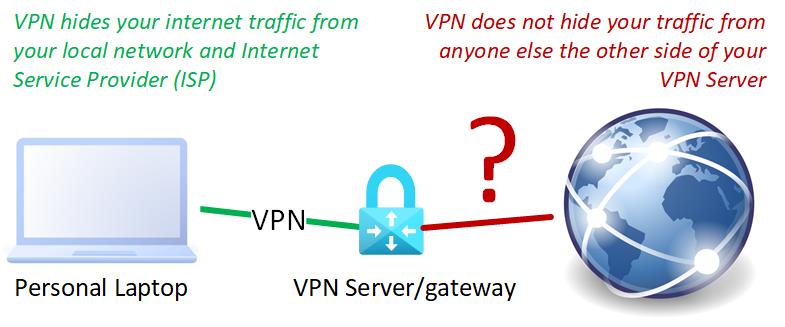
Your network traffic is hidden inside an encrypted tunnel so that other users on your local network, or your ISP, cannot see your internet traffic. However, other parties, including the VPN Provider can see your internet traffic when it leaves the VPN Server.
-
Any web sites or services that you visit see the IP address of the VPN server instead of the external IP address of the network your device is connected to; this can work around any IP address restrictions such as geographic controls to access digital services.
An IP address is a unique number assigned to all computers and internet-connected devices so they can communicate with each other
What your VPN provider doesn’t do…
Provide anonymity for your location
VPN providers may;
- Claim they don’t keep any logs
- Run their business in a country that doesn’t require compliance with investigatory powers
- Accept payment via Bitcoin
But in all cases, you connect to their VPN service from your own device with an IP address that identifies the network you connect from. Have you verified their claims and wondered if your low monthly subscription includes any kind of protection?!
Provide anonymity for your device
Once the VPN is connected you will probably use your own web browser which provides a digital fingerprint and user-agent to the web sites to which it connects.
Provide anonymity for you
Although more obvious these days with GDPR-compliant cookie consent banners, any cookies that include your personal data on your device are still available to web tracking and internet marketing sites when you are connected to the VPN.
Offer end-to-end protection
There are a few things to consider regarding the protection VPNs and VPN Providers offer:
-
VPN tunnels are encrypted but that is only effective between your VPN client and the VPN server you chose to connect to. If you visit a web site with plain old HTTP, then that connection is NOT encrypted from the VPN Server to the target web site.
-
Once your data/internet traffic leaves the VPN server it is open to the same kind of traffic interception/man-in-the-middle attacks as if the data was leaving your own device. It’s just in a different location.
-
All internet traffic is received by the browser on your device, making it, and you, susceptible to inbound threats such as malware and ransomware.
-
It’s safe to assume that the low monthly subscription you pay for your
VPN Servicedoesn’t include any legal cover for you. It would also be wise to assume all connections are logged and not ‘hide’ behind VPNs for any illegal activities.
Conclusion
They way in which organisations deploy VPN Servers makes absolute sense, in line with their intended purpose.
The VPN Providers selling to individuals are not using VPN Servers for their intended purpose. There are no private networks which the end-user devices virtually join as a Virtual Private Network.
Instead, VPN Servers are used as basic proxy servers but without the added safety and controls that proxy servers can provide for browsing the internet. This is probably because proxy servers are relatively harder/more expensive to operate as a public-facing secure shared service, even if they are a more suitable technology in this scenario.
Services such as MySafeInternet provide added protection for internet browsing by seperating the web browser from the end-user device. MySafeInternet can be used in addition to VPNs, providing an added layer of protection for your device.
However, as the popularity of VPNs seemingly implies; there is no shortage of people wishing to swap visibility of their internet traffic from their ISP to their VPN provider with the bonus of obtaining an IP address for consumption of digital services in another region.